How to use the Do Not Suggest List
Last updated: June 16, 2026
In this article: How to prevent specific names or terms from being suggested as redactions in your case.
The Do Not Suggest list lets you add words or phrases that should never be flagged as redaction suggestions in a case. A common use case is excluding the data subject's name, so it isn't flagged for redaction throughout the case.
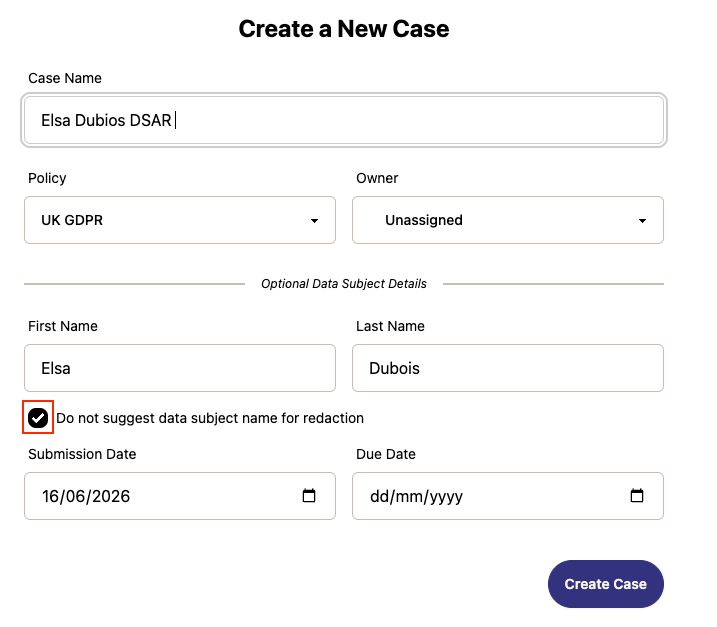
Adding a name when creating a case
When creating a new case, you can optionally add the data subject's name under Optional Data Subject Details. Check the Do not suggest data subject name for redaction box to automatically add their name to the Do Not Suggest list.
Adding a term via Case Settings
You can also add terms at any time from within the case.
From inside your case, click Case Settings
Scroll down to the Do Not Suggest section
Type the word or phrase in the text field
Click + Add term
Click Update
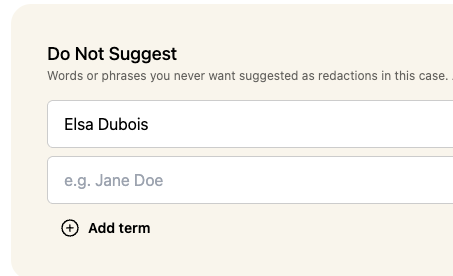
You can add multiple terms — each one will be excluded from automated redaction suggestions across the case.
Things to note
Adding a term after files have been uploaded removes any matching suggestions — but does not remove redactions that have already been applied
Removing a term from the list does not bring back previously removed suggestions
The list is case-level, so terms only apply to the case they're added to