How Deduplication Works
Last updated: August 20, 2026
When you upload documents into a case, it's common to have the same file appear multiple times — for example, the same email in multiple inboxes, or the same attachment sent across dozens of emails. Phaselaw automatically identifies and excludes these exact duplicates from your review set, so you only ever review each unique file once.
What problem is being solved?
When exporting data from your organisation's systems, the same file can appear repeatedly — a document shared with five people may appear five times, and an email sent to a team may show up in every recipient's mailbox export.
Without deduplication, reviewers waste time going over identical content multiple times, inflating document counts and slowing down the review process.
Deduplication answers the question: "Have I already seen this exact file?" If so, only one copy needs to be reviewed.
How it works
Phaselaw uses different deduplication approaches for documents and emails:
Before upload
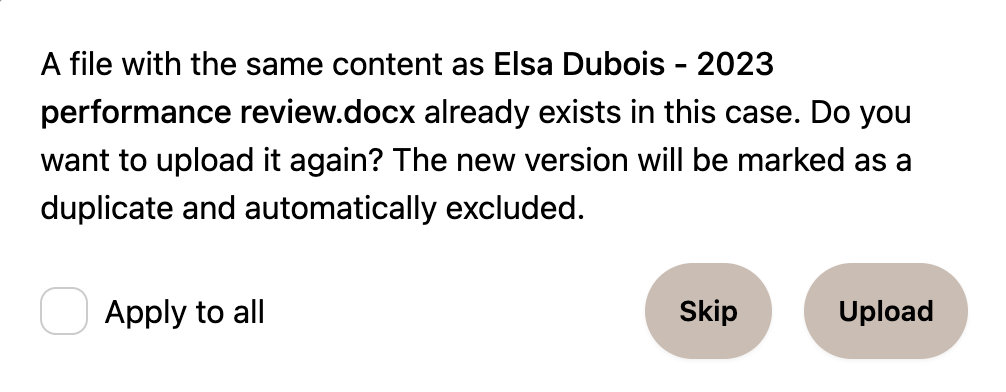
When you upload files, Phaselaw checks whether any of them already exist in the case before they're uploaded. If a duplicate is detected, you'll see a prompt asking how to handle it:
Skip — don't upload the duplicate
Upload — upload it anyway, it will be marked as a duplicate and automatically excluded from review
You can tick Apply to all to apply your choice to all duplicates in the upload at once:
Documents
For documents, each file's content is processed through a hashing algorithm to produce a unique fingerprint. When two files share the same fingerprint, their contents are identical — Phaselaw automatically designates one as the authoritative version and flags the other as a duplicate. File names are not considered, so two files with different names but identical content will still be detected as duplicates.
Emails
For emails, deduplication works differently. The same email often appears in multiple inboxes at once — for example, your IT export might include a copy from John's sent folder and a copy from Jane's inbox. Every sent email has a globally unique Message ID header that is automatically assigned by the sending email server. Phaselaw uses this to identify and remove duplicate copies, so only one version is surfaced for review.
Email attachments
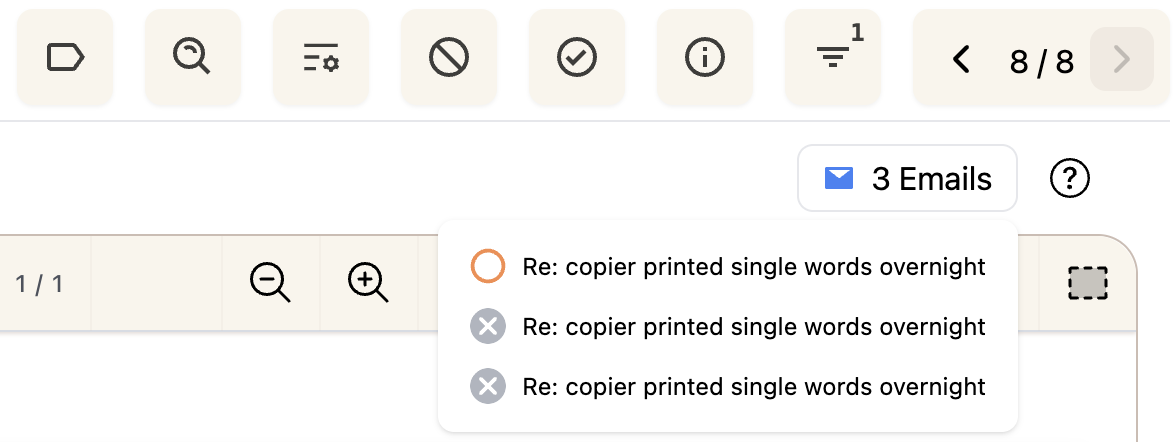
Email attachments are handled differently again. If an attached file already exists in the case, Phaselaw won't upload it a second time. Instead, it writes a reference showing which emails the file was attached to — demonstrating the one-to-many relationship between a file and the emails that include it as an attachment:
When does it happen?
Deduplication happens automatically on upload — you don't need to do anything to trigger it. As soon as your files finish uploading, Phaselaw compares them and marks any duplicates before you begin your review.
Once your files have uploaded, you can check which documents were marked as duplicates by selecting More Filters>Show Duplicates:

What deduplication does not do
It does not remove or modify any file. Duplicates are marked and excluded from review as duplicates but remain in the case and are recorded in the audit trail.
It does not identify files with similar but not identical content — for that, see How Near-Duplicate Detection Works
It does not identify the content of one email fully contained in another— for that, see How to Exclude Redundant Emails